Hi Broc –
Welcome to the Holygon community!
Thank you for this Landshape feature request. Yes, this is coming.
Shade was introduced into Landshape in 2025 as an experimental command.
After a few months of testing, Holygon decided to generalize Shade and greatly improve how it works.
In the next Landshape release, one of the new features will be this much-improved Shade. Holygon calls this system Landshade.
Landshades are Sketchup materials. But they are supercharged with special properties. You can think of a Landshade as a kind of dynamic material.
When you use Landshape commands to apply a Landshade to terrain, you can make your terrain change face color depending on local terrain properties.
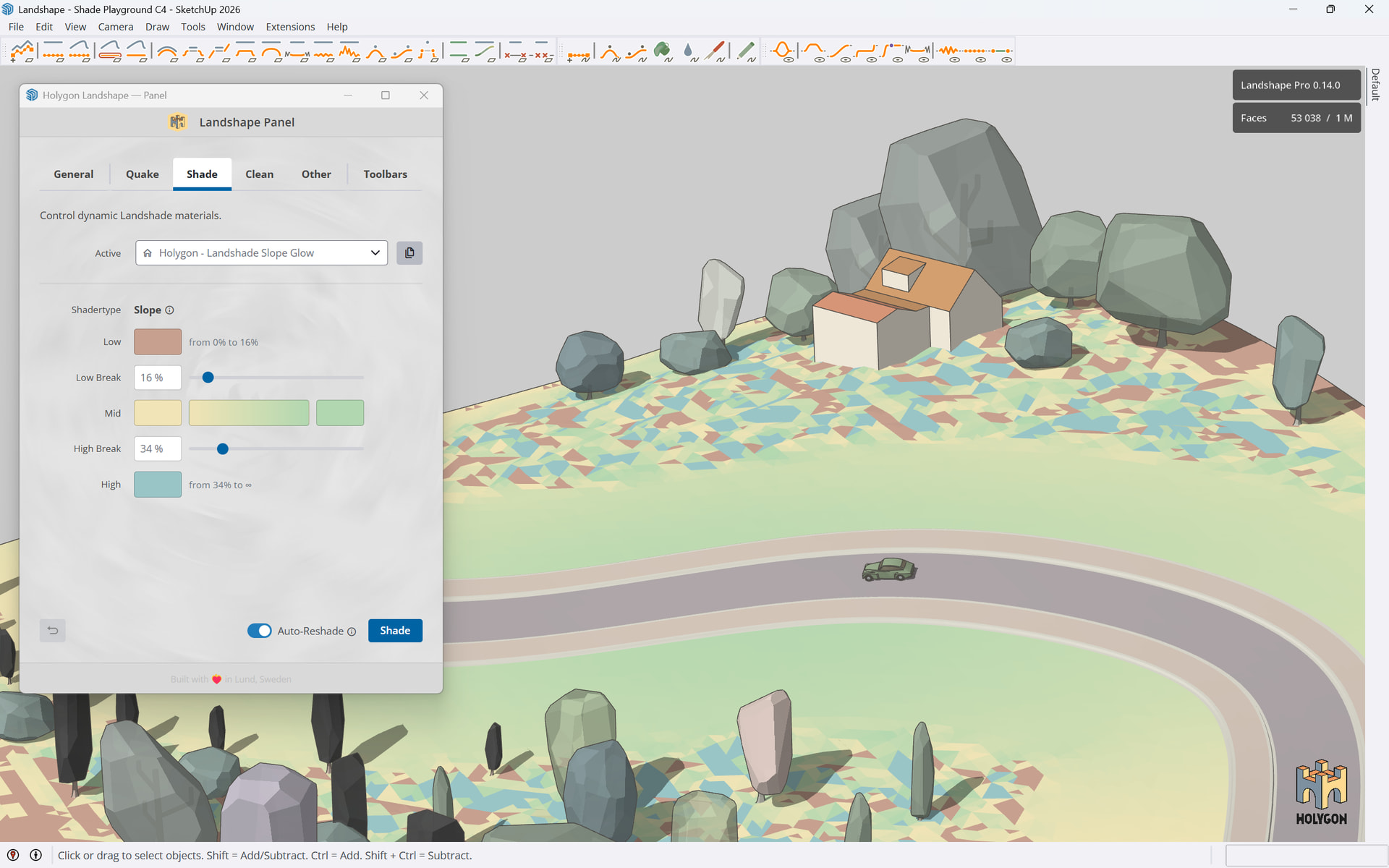
For instance, in the Slope Shadertype, you can make your flat terrain show one color, your sloping terrain show another color, and your steep terrain show a third.
Here is a quick work-in-progress screenshot:
Screenshot showing a preview of Holygon Landshape’s new Landshade feature.
Your terrain face appearance is controlled by the Landshade you are using, in combination with your terrain’s local properties, like slope, position, and similar.
In the next release, you will be able to select among a small library of Landshades, use different Landshades in your model at the same time, watch your terrain change surface appearance depending on local terrain shape, create your own Landshade variants, and apply them to your terrain.
The next Landshape release is planned for June 2026.